You own it. It runs locally.
Your data stays yours.
The only AI code editor with a true Air-Gap Mode. Bundled inference, no Ollama setup, no cloud round-trips - your code never leaves the machine.
Privacy you can prove.
Most editors stop at a privacy policy. Onyx ships the controls, logs, and exports so you can demonstrate it for yourself, your security team, or an outside auditor.
Local AI, by default.
The bundled llama.cpp engine runs on your machine and binds to 127.0.0.1 only. Nothing leaves your computer unless you explicitly attach a remote model.
One toggle, off the grid.
Air-Gap Mode stops Onyx Code's own outbound traffic: AI requests, downloads, updates, the built-in browser and HTTP MCP servers. Brand-green status pill so anyone walking by your screen can see it. Your local model keeps working.
Tell Onyx where AI can't go.
Per-file globs in .onyxnoai hide secrets, dotfiles, or vendor code from the model entirely. A workspace kill switch turns AI off for regulated codebases - no uninstall, no log-out.
Catch a secret before it ships.
Every prompt and attachment scanned locally for AWS, GitHub, Stripe, OpenAI, and Slack tokens, JWTs, and PEM keys before the model sees them. Confirmation dialog: Redact, Send anyway, or Cancel.
Every AI call. Audit-trail PDF.
Local JSONL log of every chat, autocomplete, and MCP call - model, time, token counts. One click exports a PDF for your security team. Content cannot appear in it by schema construction.
No telemetry. Period.
Every upstream VS Code telemetry endpoint is empty in product.json. There is nowhere for data to go even if a setting is flipped. Independent of Air-Gap - defense in depth.
Security you can verify.
Onyx Code maintains a canonical security checklist, a fully-automated audit skill, and a public findings log. Every claim below points to a file path in the source - read it yourself, don't take our word for it.
Three-layer Air-Gap.
App-level gatedFetch blocks Onyx's own calls. An in-host check covers MCP HTTP and SSE transports. Electron's session.webRequest is the final backstop. 0.0.0.0 is not loopback - SSRF blocked.
Privacy leaks won't compile.
The Air-Gap callback is a required constructor parameter on every MCP HTTP handle. A future transport that forgets to wire it up is a TypeScript error at build time, not a silent leak at runtime.
Append-only by construction.
The activity log accepts eight metadata keys - model, timestamp, workspace, token counts, latency, network flag. No slot exists for prompts, responses, file paths, or embeddings, so they cannot appear in the log no matter what runs above.
Filesystem boundaries that hold.
Model downloads are prefix-validated against the models directory after stripping `..` and absolute paths. Project memory rejects Windows reserved names. Glob patterns compile via VS Code's parser - no raw regex injection.
Hash-verified at every spawn.
llama-server is SHA-256 checked at every launch against a pinned sidecar. Hash mismatch refuses to spawn. No $PATH lookup. All three inference processes bind to 127.0.0.1 only.
Verifiable, not just claimed.
A canonical security checklist and an automated audit skill live in the repo. Every claim above points to a file path in the source - read it yourself, don't take our word for it.
Most editors stop at a privacy policy. Onyx ships the controls, the logs, and the source so you can verify it.
Read the full security overviewEverything you'd expect, and a few things you won't find anywhere else.
Local AI
Bundled llama.cpp, no Ollama install. BYOM with any GGUF.
GPU Acceleration
GPU-accelerated engine built in. Metal on Apple Silicon; Vulkan on Windows for NVIDIA, AMD, and Intel. Auto / GPU / CPU switch, no setup.
Air-Gap Mode
Hard application-level switch. Status-bar badge. Audit log.
Codebase Chat
@-mention any file or folder. RAG-powered context.
Inline FIM
Codestral + speculative decoding. Near-instant suggestions on M-series.
Smart Apply
Every AI edit lands in a reviewable diff. Partial code blocks go where they belong, never over the rest.
.onyxrules
Project rules file. Auto-detects .cursorrules for migrants.
Activity Log
Auditable record of every AI call. PDF export for your CISO.
Commit Messages
Local AI drafts your Conventional Commits. Pairs with PR descriptions.
Agent Modes
Plan / Ask / Edit-auto / Auto. Toggle from the chat toolbar.
MCP + Bundled Pack
Filesystem, git, sqlite, fetch. One click to enable. Air-Gap Mode blocks installing fetch.
Worktree Sandbox
Auto-mode agents run in an isolated git worktree. Apply or discard back to main.
Permission Rules
.onyx/permissions.json with allow / deny patterns for shell, files, and MCP tools. Committed to git, reviewed in PRs.
Quality Guardrails
Loop guard, destructive-edit guard, prompt sanitizer. Small-model failure modes caught.
Predictive Edits
Change a value once; ghost text suggests the same change everywhere it applies. Pure heuristic, no model call.
Next-edit prediction
Tab jumps to the next predicted edit. Bundles Zed's open-source Zeta-2, fully local. (Free tier)
Project Memory
Persistent context across chat sessions. The agent reads and writes per-workspace memory files; carries decisions forward.
Model Manager
Browse, download, and hot-swap GGUF models from a built-in catalog. Per-device quantization picker, no terminal.
Prompt Sanitizer
Strips secrets and PII before any request leaves the editor. Regex and entropy rules you control, on every send.
Open VSX Extensions
Install any Open VSX extension. Themes, linters, and debuggers - your existing setup carries straight over.
A focused look at how Onyx compares.
The questions teams ask first, lined up side by side with the alternatives. The full matrix is one click away.
| Feature | Onyx Code | Cursor 3 | Copilot | Void | Zed |
|---|---|---|---|---|---|
| Cost | $39 once | $20 / mo | $10 / mo | Free | Free + paid AI |
| Code stays on your machine | Always | Cloud-routed | Cloud by default | Once Ollama is set up | Once a server is set up |
| Air-Gap Mode: one-click hard switch | Only Onyx | Structurally can't | |||
| AI Activity Log + audit-PDF export | Only Onyx | ||||
| .onyxnoai patterns + workspace kill switch | Only Onyx | ||||
| Bundled inference (no Ollama, no setup) | Only Onyx | Cloud-only | No bundled engine | Requires Ollama | Requires user-run server |
| GPU acceleration built in (NVIDIA / AMD / Intel, no setup) | Only Onyx | Cloud-only | No bundled engine | Via Ollama GPU | Via local server |
| Prompt sanitizer: redacts secrets before AI sees them | Only Onyx | ||||
| Low-latency FIM with speculative decoding (bundled) | Server-side | Server-side | Manual flags | Manual config | |
| Local commit-message + PR-description generation | Via cloud | Via cloud | Via plugin | ||
| Agent suite: Plan / Ask / Edit-auto / Auto + MCP + worktree | |||||
| Bundled MCP server pack: filesystem, git, sqlite, fetch | Install each | Basic | |||
| Inline edit prediction (Cursor-Tab / Zeta-style) | Zeta-2, Free tier | Cursor Tab (paid) | Zeta (free) | ||
| Model A/B comparison (one prompt across 2 to 5 models) | Only Onyx |
Why a whole editor, and not a VS Code extension?
Because the promises above would be unenforceable as an extension.
An extension can promise that its own code does not call out. It cannot enforce a boundary for the process it is loaded into, and it cannot switch off the host editor’s telemetry.
Air-Gap Mode blocks Onyx Code’s own outbound traffic (not the requests extensions make themselves) in three layers, with a check inside the extension host on every HTTP MCP transport and a backstop in the Electron runtime, two places an extension cannot put a check of its own. The same goes for a kill switch spanning every AI surface, and for shipping the inference engine and a model inside one signed, notarised installer, so that “it works offline” is true on first launch rather than after a setup guide.
And the cost, from us rather than from someone else.
A fork cannot use Microsoft’s marketplace, so extensions come from Open VSX, and a handful of Microsoft-proprietary ones have no equivalent there. The first-run wizard names yours before you commit to anything.
If that trade is the wrong way round for you, an extension plus your own local model runtime is a legitimate choice, and our comparison with Continue.dev says so plainly.
For engineers who want capable tooling without the cloud round-trip.
Autocomplete tuned to your repo, codebase-aware chat, sandboxed agent runs, and a quiet activity log of everything that happened.
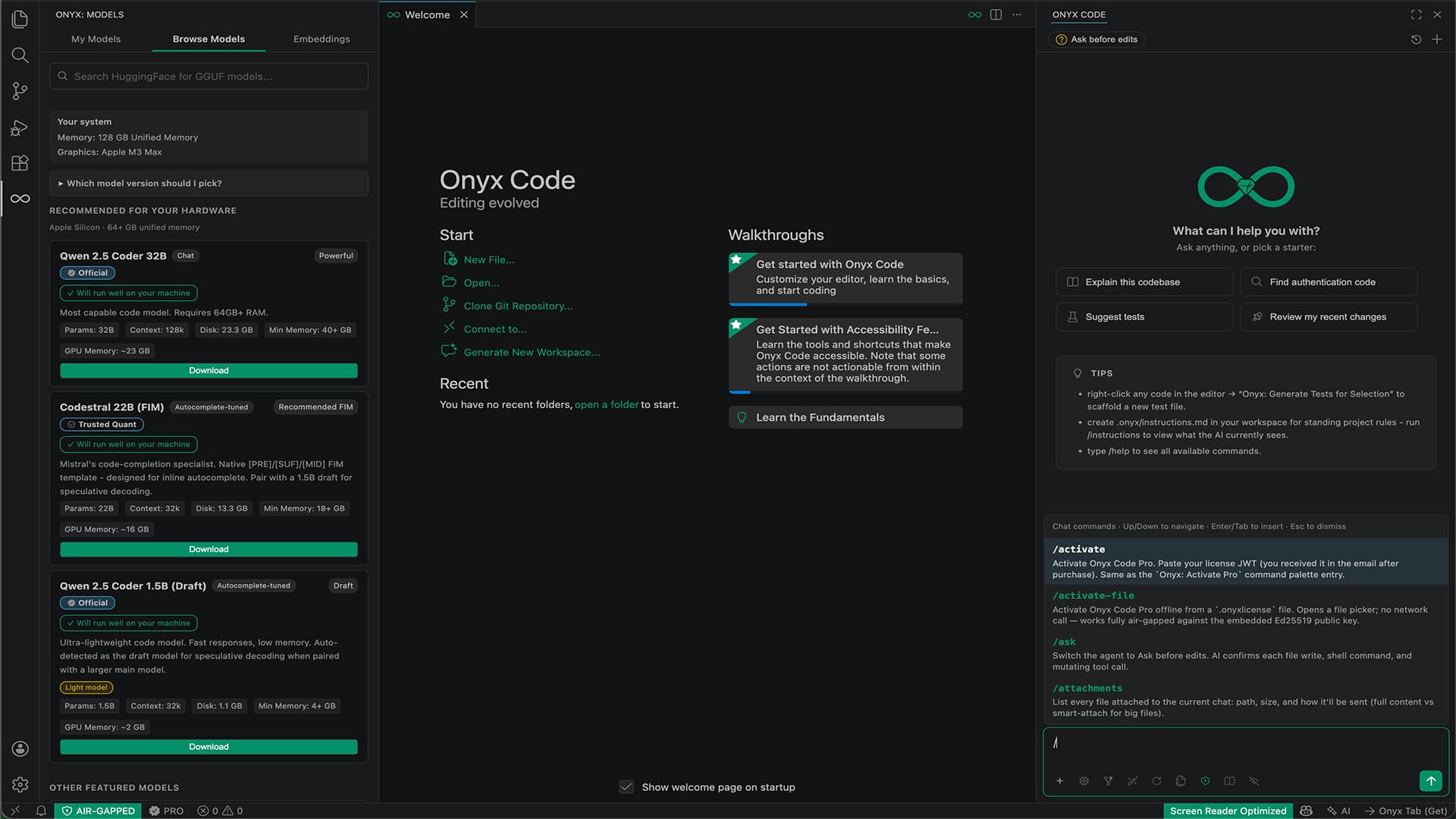
Two minutes from install to your first chat.
No external runtime, no command line, no config file. Onyx ships with a bundled engine and a small starter model, so you can start chatting while a larger model streams in the background. Drop in any .ggufwhen you're ready.
Install
.dmg, .exe, .AppImage (about 500 MB base). Models download on demand based on your hardware.
Pick a model
The Welcome wizard recommends one for your machine. Or drag-and-drop your own .gguf. No Ollama, no LM Studio, no command line.
Code
VS Code import in one click: settings, keybindings, snippets, themes, extensions. .cursorrules auto-detected. Press Cmd+L.
Most local-AI editors hand you a checklist. Onyx hands you a running model.
Free is the whole editor.
Pro adds the agent workstation.
Free
The whole editor, local AI, and the full privacy toolkit. Forever.
No time limit. No telemetry by default.
OnyxCode Pro
Everything in Free, plus the full agent workstation.
One-time payment. Use on up to 3 personal machines. No subscription.
Already paid?
Pick your platform.
One installer per architecture. Same editor on every OS - your license activates anywhere.
brew install --cask onyxcode-app/tap/onyx-codePrefer Homebrew? This installs the same notarized build and keeps it in Applications.
winget install OnyxCodewinget is built into Windows 11 and recent Windows 10. If you don't have it, install it from Microsoft.
Latest release v2.4.1 · 2026-10-04
Four developers. Four reasons. Same editor.
Different jobs, different constraints. Same install.
Her employer prohibits Cursor and Copilot. She used to copy-paste code into ChatGPT on her phone. Now she runs Onyx Code with Air-Gap Mode and Qwen2.5-Coder 14B on her work MacBook. Her CISO signed off in two days after seeing the audit-PDF export.
Tired of $20/mo for an editor that requires an internet connection. Bought OnyxCode Pro for $39 - what Cursor charges in under two months. Already saved $201 over the year, and his code never leaves the M3 Max.
Air-gapped workstation, no internet by policy. Generates an offline .onyxlicense file from her connected laptop, sneakernets it across, drops it in ~/.onyxcode/license/. Pro features unlock with no network call ever. Onyx is the only AI editor she is allowed to run.
Can't afford a Cursor subscription. Installs Free, uses BYOK with a $5/mo OpenRouter key for chat, runs a local 3B model for autocomplete. Zero monthly cost, zero data leaks.
Common questions, straight answers.
Onyx Code is a full IDE (a fork of VS Code) that runs AI models entirely on your machine. No cloud round-trips, no subscription, no usage caps. Unlike cloud-based AI editors that send your code to remote servers and bill per month, or IDE plugins that ask you to install and wire up your own local model stack, Onyx ships with a curated GGUF model catalog, a one-click Welcome wizard that picks the right model for your hardware, a one-toggle Air-Gap Mode that blocks Onyx Code's own outbound requests, zero telemetry, and a one-time payment for Pro features (use on up to 3 personal machines).